Delete user
What happens when an account is deleted?
When a user's account is deleted, that person is no longer known as a registered user in OpenOlat and can no longer be found.
When an account is deleted, it is not removed from the database but anonymised: the login name is replaced by an anonymous identifier and the profile data is cleared. Objects that are linked to the account (e.g. posts, certificates, booking orders) therefore remain, but only refer to the anonymised account. The table below therefore distinguishes between deleted, anonymised and retained.
Work results created by that person are subject to their own rules when the account is deleted. See below: What is deleted?
Who may delete user accounts?
Whoever wants to remove an account permanently needs the role administrator. Only for this role does user management show the "Delete users" button above the result list.
User management itself is reached by several roles:
- User manager
- Roles manager
- Principal
- Administrator
- System administrator
These roles search accounts, change user settings and status and, depending on the instance, also see the "Delete user" area, but do not delete accounts themselves. System administrators additionally trigger deletions via the automatic user lifecycle.
Option 1: Via the account search
Step 1:
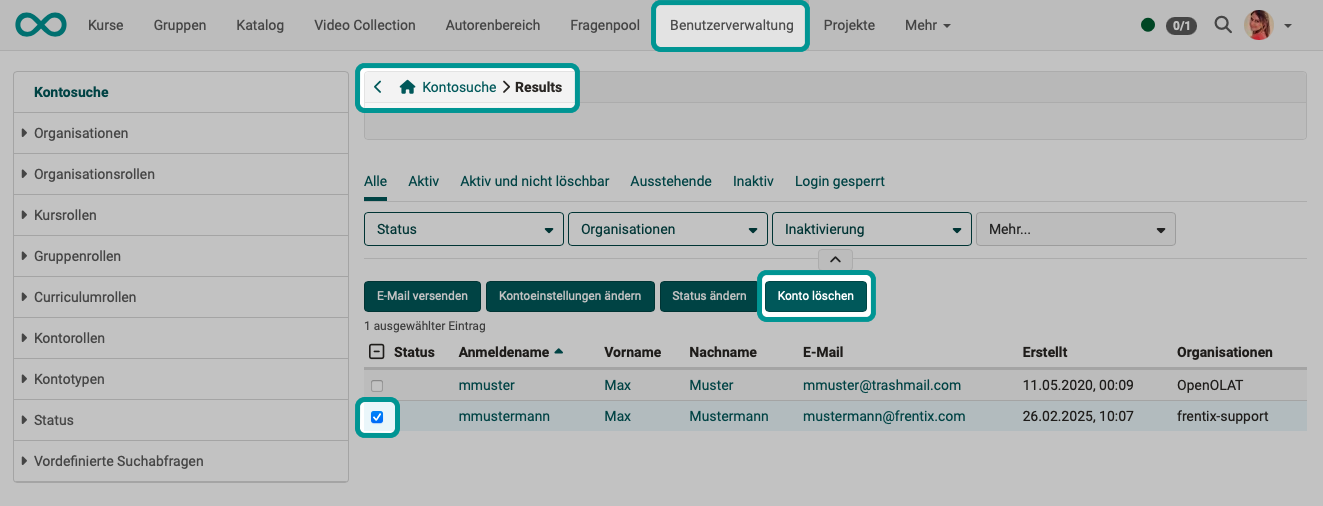
In the user management, use the account search to find the users whose accounts are to be deleted.
Step 2:
In the search results, mark the users to be deleted using the checkbox at the beginning of the row. As soon as at least 1 person is marked, the "Delete users" button appears above the list.
Step 3:
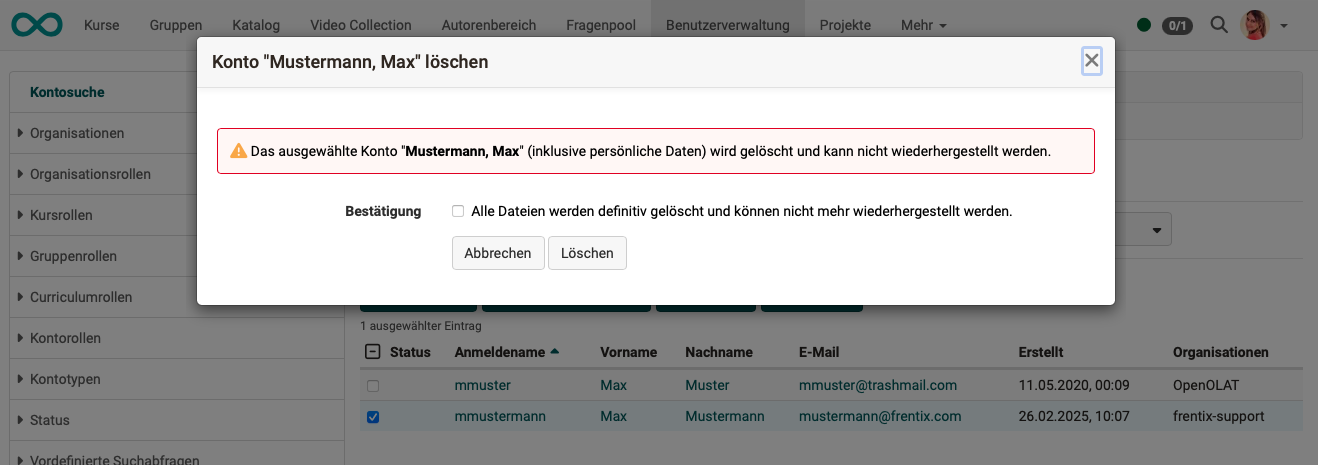
After clicking this button, a confirmation dialog appears which you must confirm.
Option 2: Search for inactive / deactivated accounts
Step 1:
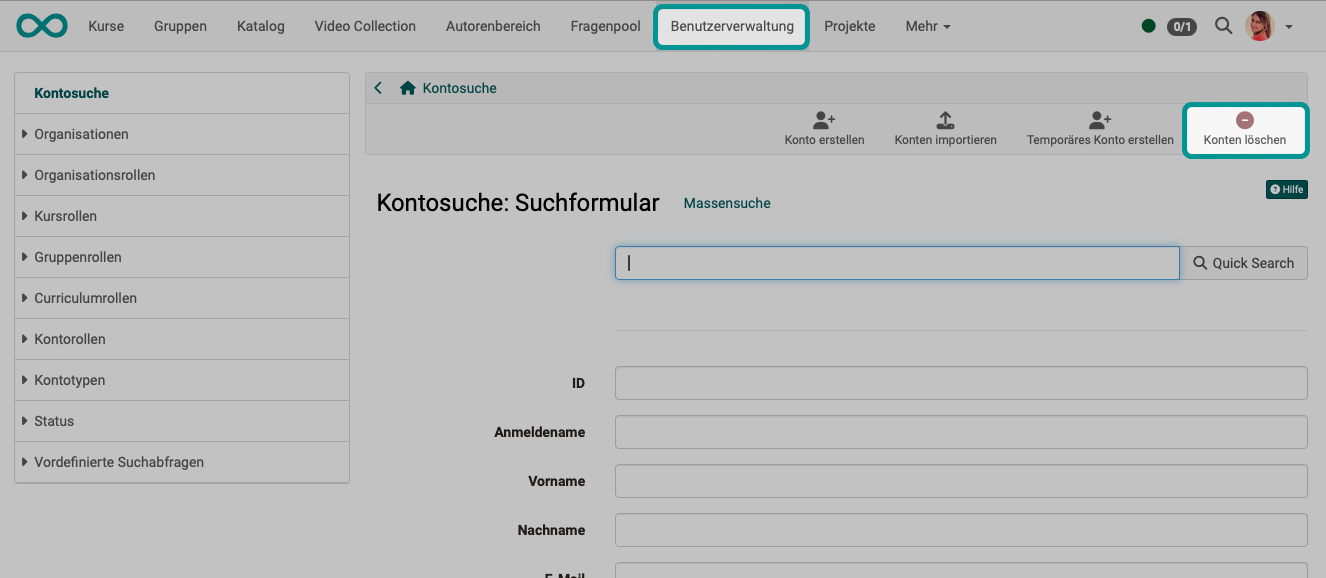
Users can also be selected and their OpenOlat accounts deleted via the "Delete user" link.
Step 2:
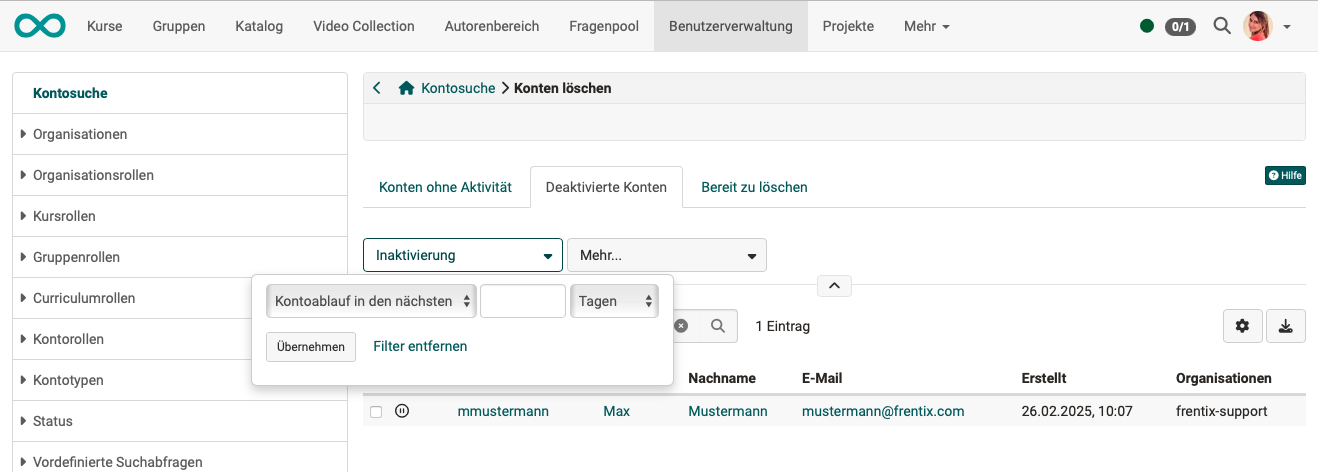
Candidates for deletion are pre-sorted into 3 tabs, corresponding to the phases of the automatic user lifecycle:
Tab "Accounts without activity": Users who have not been active for a configured period of time. The inactivity period is set by the administration.
Tab "Deactivated accounts": Users whose account has already been deactivated automatically or manually, as well as accounts with upcoming deactivation.
Tab "Ready to delete": Users whose account has exceeded the configured deactivation period and is ready for permanent deletion.
On all three tabs, the Inactivation filter narrows the list by period, either to "Account expiry in the next" or to "Inactive for the last", in days, weeks, months or years.
Configuration of the automatic user lifecycle
The automatic user lifecycle runs in two steps: Deactivation and Deletion. Independently of this, the account expiration deactivates an account on its stored expiry date. The applicable deadlines and notifications are configured in the system administration: Administration > Life cycles > User
Details on the automatic user lifecycle
Step 3:
Mark the users to be deleted using the checkbox at the beginning of the row. As soon as at least 1 person is marked, the "Delete users" button appears above the list.
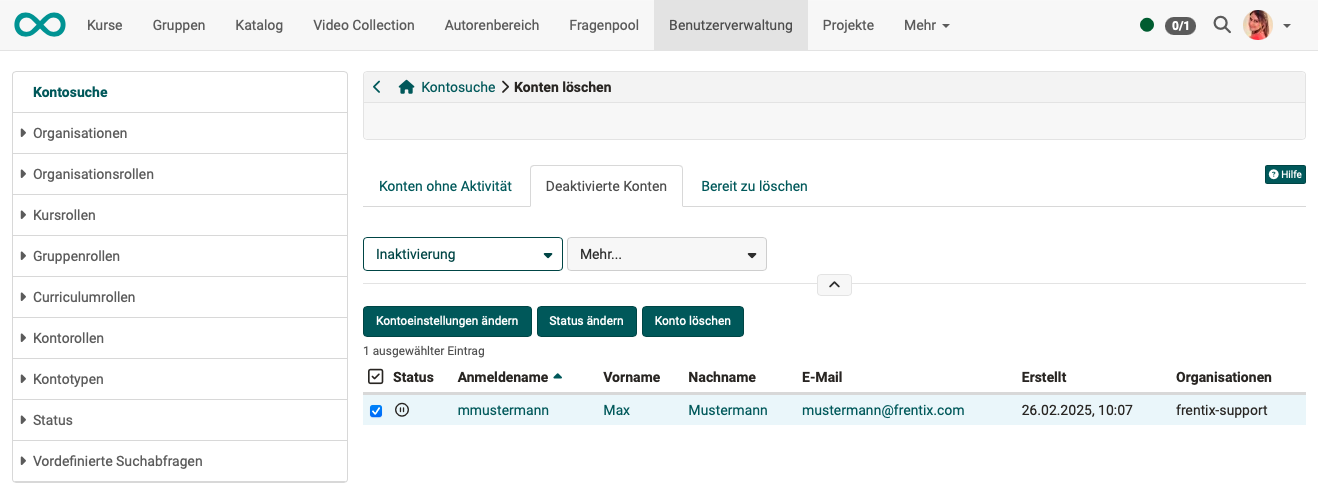
Step 4:
After clicking this button, a confirmation dialog appears which you must confirm.
Option 3: Automatic deletion
Users can also be deleted fully automatically by an activated automatic user lifecycle.
Details on the automatic user lifecycle >
How do I manage lifecycles of groups, courses or user accounts? >
What is deleted?
When a user is deleted:
- some information must be irreversibly deleted (e.g. phone number)
- some information can/should be retained without a name (e.g. a forum post without which a discussion thread would lose its meaning)
- some information must be retained (e.g. billing address → retention obligation)
It must be taken into account that OpenOlat links the information to different objects:
= Information is directly linked to the person
= Information is stored together with a course/group/etc.
= Information is stored in the OpenOlat system
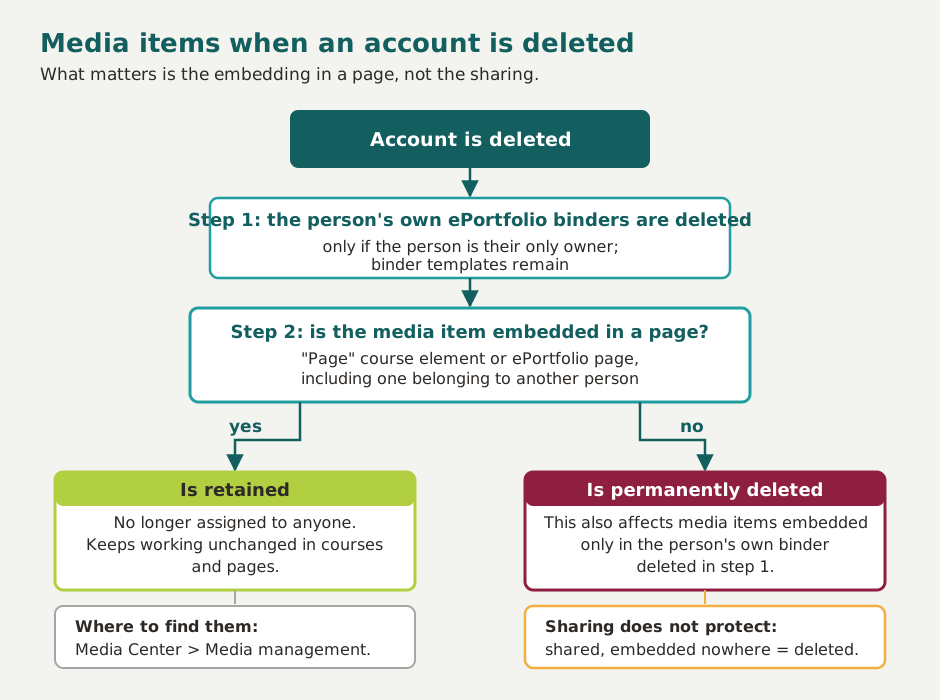
The most frequent question concerns the media items in the Media Center. There, a single question decides the fate of a media item, and the diagram shows it with both of its outcomes.
| Information | What happens to it? |
|---|---|
User management > Profile |
Deleted: Login name, first name, last name, email, email signature, date of birth, gender, private phone, mobile phone, business phone, Skype ID, XING profile name, ICQ, homepage, street, address supplement, PO box, postal code, region/canton, city, country, institution, institution number (matriculation number), institution email, organisational unit, study group, field of study, personal text "About me", personal profile picture. Exception: For persons with an administrative role, first name and last name are retained, see Whose name is retained?. |
User management > Business card |
All details on the business card are taken from the profile, so after the profile is deleted they are no longer available for the business card either. The user's business card is no longer displayed in OpenOlat (e.g. in forums or comments). |
User management > System settings |
All system settings are deleted: general system settings (e.g. language), special system settings (e.g. the start page) and user tools. |
User management > Account |
Account type, account creation date, last login and account expiry are deleted. The account is set to the status "deleted". |
| Roles | The roles and permissions assigned in user management are deleted. |
User management > Password |
The password of deleted users is irreversibly deleted. |
User management > Authentications |
All authentication options are deleted. |
User management > Properties |
Properties are completely deleted. |
User management > GUI settings |
GUI settings are completely deleted. |
| Booking orders | Booking orders are retained, including those of the type "Invoice". The name is not stored separately in the booking order but comes from the profile; after deletion it is therefore anonymised. |
| Billing address | To be able to trace payments (e.g. for tax authorities), billing addresses are retained. |
| Reasonable adjustments | Recorded reasonable adjustments are not deleted; they remain linked to the anonymised account. |
| Subscriptions | All subscriptions are deleted. |
| Relationships | Relationships to other users are not dissolved. They remain and refer to the anonymised account. |
| Organisational membership | Membership in organisations is deleted. |
| Quota | The personal storage space (quota) and its associated settings are deleted. |
| Events / Absences | The attendance records and the absences of the person are deleted, as well as their attendance rate per course. |
| Competences | Competences are deleted. |
| Course Planner roles | The Course Planner roles are deleted together with the account, as they are memberships. |
| Personal calendar | The personal calendar is deleted. |
| Chat history | The chat messages of the person are deleted, as are their entry in the contact lists and the chat settings. Only the posts written by this person are removed. The posts of the other participants in the same conversations remain. |
| Personal folder | The personal folder is deleted. |
| Portfolio | Binders, sections and entries created in an ePortfolio are deleted. If binders were shared with other users, they are no longer accessible there either. This row covers the deleted person's own binders, sections and entries. Comments that this person left on shared entries of other people are covered by the following row "Comments". |
| Comments | The comments of the deleted person are deleted together with their attached files: in courses, on videos, in the question bank, in blogs, in podcasts and in the Library. Two kinds of comments stay readable instead. First, the comments on ePortfolio entries. The other people involved use them to comment on and assess the portfolio work, so the text and the attached files remain unchanged. This also applies to comments the deleted person wrote on their own pages, and to comments on binders that still come from an earlier portfolio version. Second, every comment that someone has replied to, everywhere in OpenOlat and not only in the ePortfolio, because without it the replies lose their reference. The author of a retained comment is shown as "Unknown user", with the icon of a deleted account instead of the profile picture and without a link to the business card. If the deleted person holds an administrative role, first and last name stay visible. See Whose name is retained?. Retained comments and their files disappear for good as soon as the corresponding page, section, binder or course is deleted. |
| Personal to-dos | The assignment to the deleted account is removed; the to-do entry itself remains but is then no longer assigned to anyone. (to-dos in projects: see below) |
| Mailbox | Emails listed in the mailbox of the personal menu are deleted. (The internal email inbox is completely deleted.) |
| Recipient of a reminder email | If the deleted user was a potential recipient of a reminder email, the email will no longer be sent to the deleted person. (The recipient list is created at the time the rules are checked, so a deleted person no longer appears on the mailing list.) |
| Group membership | Group memberships are deleted. (The groups themselves are not deleted, even if they were created by the deleted user and they were the only member. Only the deleted user is removed as a group member. If the deleted user was the only group coach, an administrator is entered as a substitute group coach. As a rule, groups without members will then be deleted at a later point in time by the group life cycle.) |
| Project membership | Project membership is deleted and the person is no longer found in the list of project members. (To-dos created by the deleted user in a project are retained, however.) |
| To-dos in projects | In projects, the to-dos of a deleted user are retained but are no longer assigned to anyone. Completed to-dos are also retained (without specifying the user who was supposed to complete the to-do). The progress of projects remains visible. Uncompleted to-dos must be reassigned. |
| Course membership | Course memberships are deleted, even if the role in that course was "Owner" or "Coach". If the deleted user was the creator and sole owner, an administrator is entered as a substitute owner. |
| Data in the course element Task | Documents created and uploaded within a task by the deleted person are deleted (e.g. draw.io, Word, Excel, ppt). |
| Peer review data in the course element Task | The files submitted or uploaded by the person are deleted. The peer review records (assignments, assessments) are retained and refer to the anonymised account. |
| Data in the course element Participant folder | The person's files in the Participant folder course element are deleted. |
| Data in the course element Forum | Personal forum posts and comments are anonymised after the account is deleted and displayed as "unknown user". |
| Data in the course element BBB | Participants in BBB meetings are deleted. |
| Data in the course element Adobe Connect | All data stored by OpenOlat in the background is deleted. |
| Data in the course element Vitero | All data stored by OpenOlat in the background is deleted. |
| Office for the web | All data stored by OpenOlat in the background is deleted. |
| Test results | All test results (test sessions including answers and results) are deleted. |
| Evidence of achievements | All evidence of achievements of the person is deleted. |
| Certificates | Certificates are not deleted when an account is deleted, regardless of whether they carry a QR code or a verification URL. They are retained and refer to the anonymised account, so that their authenticity can still be confirmed (host-based / signed verification). It is nevertheless advisable to inform users whose accounts are to be deleted in advance so that they can download their earned certificates from the personal menu before their account is deleted. |
| Externally acquired certificates | OpenOlat users can also upload externally acquired certificates to OpenOlat to complete their profile. These certificates uploaded by the person themselves are likewise not deleted when the account is deleted and are retained. |
User management > Badges |
Badges are retained so that authenticity can be confirmed (host-based verification, signed verification). It is nevertheless advisable to inform users whose accounts are to be deleted in advance so that they can download their earned badges from the personal menu. If global badges were awarded, the recipient's name is replaced by "unknown user" in the list of awarded global badges. Administrators find this list in the system administration: Administration > e-Assessment > OpenBadges > Awarded global badges. It remains visible when and by whom a global badge was once awarded. Even if the badge is revoked by clicking "Revoke", it remains as a list entry with the status "Revoked" in the list of awarded global badges. |
| Owner role in learning resources and courses | Learning resources and courses are not deleted when their owner is deleted, regardless of whether the learning resource was published, shared with other authors, or not referenced/used anywhere. If the deleted user was the sole owner, an administrator is entered as a substitute owner. This also applies to test learning resources. |
| Questions in the question bank | Questions from the question bank are only deleted if the person is their sole author and the setting "Delete questions when author deleted" is enabled. Questions with additional authors, as well as all questions when the setting is disabled, are retained. |
| Elements created in the Media Center | What matters is whether the media item is embedded in a page. This applies to the "Page" course element as well as to ePortfolio pages. If the media item is embedded, it is retained and is no longer assigned to anyone. If it is not embedded anywhere, it is permanently deleted. Sharing a media item in the Media Center does not protect it. Please note: the person's own ePortfolio binders are deleted beforehand, provided that the person is their only owner. Media items that were embedded only there lose their embedding and are therefore deleted as well. Administrators and learning resource managers find the retained media items under Personal menu > Media Center > "Media management" segment.It makes sense to ask the person concerned to download any media items they need before their account is deleted. If a media item is to remain in the system, it must be embedded in a page beforehand. |
| External correctors | If accounts of external correctors are deleted, they no longer appear in the lists of grading assignments. Their first name and last name are retained, however, see Whose name is retained?. The associated grading assignment records are removed; the data relevant for remuneration (correction time, "Close date") is retained in the "Archive" worksheet of the Excel report. |
| Grading assignments | If users who had grading assignments as external correctors are deleted, the following rules apply: 1) Already completed grading assignments appear accordingly assigned in the course owner's assessment tool. 2) Not yet completed grading assignments appear on the "Open assessments" list in the course owner's assessment tool. 3) Course owners can check in the change log (link at the bottom of the screen) who performed a correction after selecting the relevant test course element and a participant. The names of users who have since been deleted are still visible there. The grading assignment records themselves are removed on deletion; the data relevant for remuneration (correction time, "Close date") is retained in the "Archive" worksheet of the Excel report (see Test settings, Correction workflow). |
| Statistics | Deleted users are no longer included in the statistics of visited courses. |
| Survey results from quality management | Forms completed as part of quality management are stored anonymously and therefore do not need to be deleted when a user account is deleted. |
| Log tables | Log entries are not changed on deletion. They contain no name, only the internal number of the account; whether logging is personalised or anonymous depends on the server setting for anonymous logging. |
Whose name is retained?
After an account is deleted, the course log data and the assessments continue to show the first name and last name for some persons, and only the anonymous identifier for others. The following list states with binding effect for whom the name is retained, for example when answering a data protection request.
These persons act in an institutional function, not as private individuals. Their entries in the course log data, their assessments and similar actions should therefore remain readable and attributable even after deletion.
What counts are the roles the person holds at the time of deletion. The rule applies to all three deletion options on this page, including the automatic deletion by the automatic user lifecycle. There is no setting for it.
First name and last name are retained if the person holds at least one of these roles:
- System administrator
- Administrator
- User manager
- Learning resource manager
- Group manager
- Question bank manager
- Course planner
- Author
- Owner of a learning resource, for example of a course
Regardless of any role, the name of external correctors who were assigned a grading assignment is also retained. This is not a role in the strict sense. It is enough that the person was entered as a corrector in a grading assignment.
For all other roles, the name is anonymised. These include:
- Roles manager
- Absence manager
- Quality manager
- Project manager
- Selectus manager
- Line manager
- Education manager
- Principal
- Coach of a course or a group
- Participant
- User
- Invitee (invited person)
- Guest
"Administrative" is therefore defined more narrowly here than when roles are assigned in the user management. Roles managers and quality managers also lose their name on deletion.
Anyone who can access the user management finds the deleted accounts with first name, last name and roles in the User search, status "Deleted users". The "Roles" column shows which roles the account held when it was deleted. Use the "Clear" action to delete the first name and last name of these accounts afterwards as well.
When can a user not be deleted?
Accounts with the status "Active and not deletable" cannot be deleted, neither manually nor automatically. They do appear in the account search and can also be marked, but OpenOlat removes them from the selection when deleting. This status is typically assigned to system accounts such as the administrator account.
For automatic deletion via the automatic user lifecycle, an additional safeguard applies: if the proportion of accounts to be deleted at once would exceed a configured percentage, the automatic deletion is aborted completely.
Further information
Mentioned on this page
Life cycles - Overview >
How do I manage lifecycles of groups, courses or user accounts? >
Test settings - Administration >
User search >
Further reading
User management >
Manage user settings >
Data protection >
Media Center Concept >
Three steps to your portfolio binder >