Module Media Center
Administrators configure the Media Center in the System Administration under:
Administration > Modules > Media Center
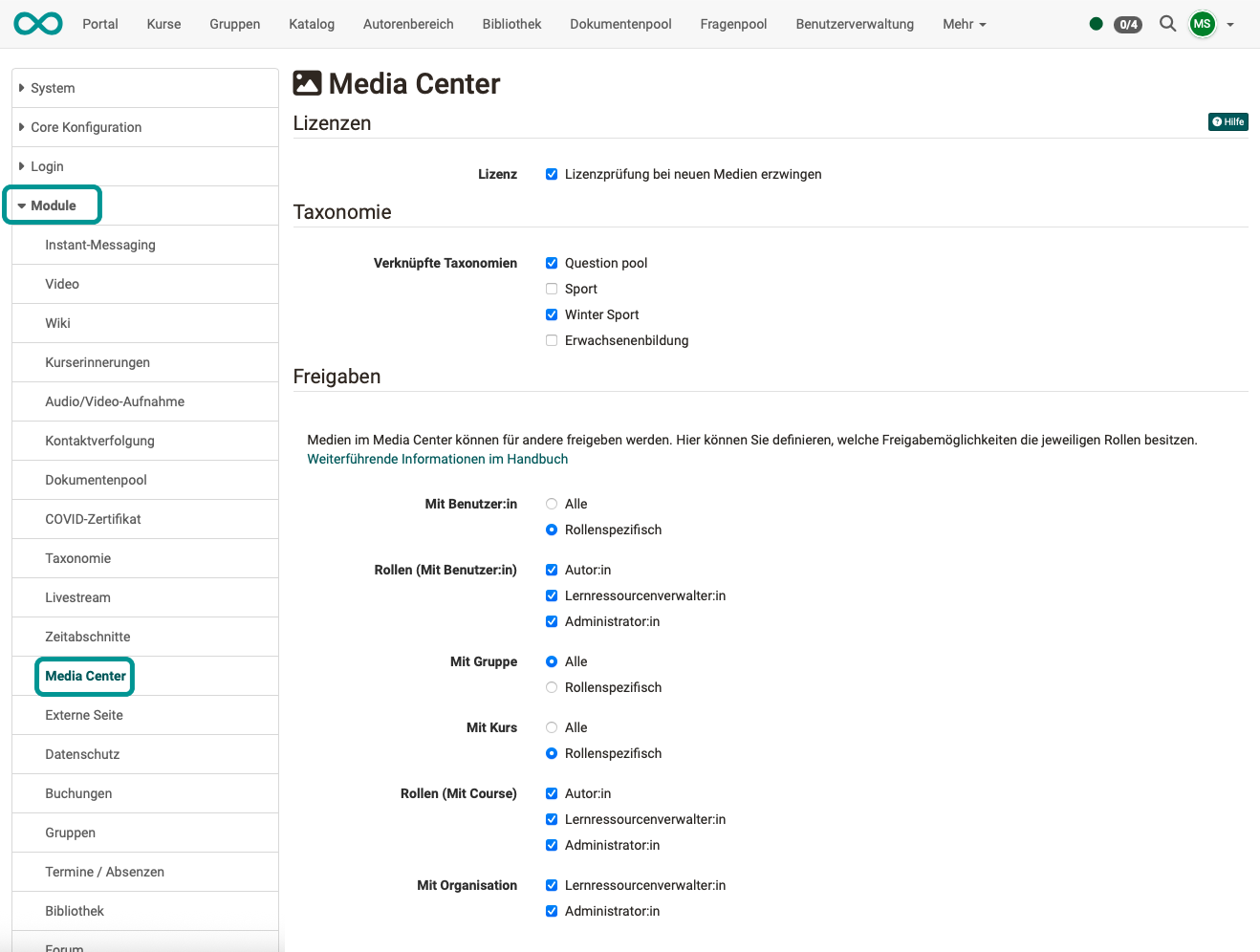
This module does not define the quota (storage space) of the Media Center itself. You set the quota in the System Administration under:
Administration > Core functions > Files and folders > Tab "Quotas"
See also Files and Folders.
To the top of the page ^
Licences
If every new medium in the Media Center must carry licence information, make the licence a mandatory field here. To do so, activate the checkbox "Force license check on new files". It takes effect when the Media Center is selected under "Activate licenses in" in the System Administration under Administration > Core functions > Licenses.
More on the usage of licences >
To the top of the page ^
Taxonomy
To sort and filter media in the Media Center by subject, you assign them subjects from a taxonomy. In the metadata of a media item, the field for this is called "Subjects". Since OpenOlat can manage multiple taxonomies at the same time, administrators define under "Linked taxonomies" which taxonomies are used in the Media Center. If no taxonomy is selected there, the Media Center uses the taxonomies that are selected in the system administration under Administration > Modules > Learning resource.
Further information can be found on the page Module Taxonomy. How the areas choose their taxonomy is explained on the page Taxonomy in the user manual.
Shares
If contents are deposited in the media center, they can be shared for others to use. Administrators define in the section "Shares" which sharing options are available to authors and other roles.
For "With user", "With group" and "With course" you choose "All" or "Specific roles" in each case. With "All", all users may share this way, even without an additional role. With "Specific roles", you select the roles author, learning resource manager and administrator individually. "With organisation" is only open to the roles learning resource manager and administrator, which you select there individually.
| My role | If "With user" is allowed by an admin |
If "With course" is allowed by an admin |
If "With group" is allowed by an admin |
If "With organisation" is allowed by an admin |
|---|---|---|---|---|
| I am user (without additional roles) | I can give co-users access, when they belong to org units where they are authorised to use the media center. | I can give co-users access in all courses, where the co-user is an owner. | I can co-users of all groups give access, if the co-user is a group member. | media sharing is not possible |
| I am author | I can give co-users access, when they belong to org units where they are authorised to use the media center. | I can give co-users access in all courses, where the co-user is an owner. | I can co-users of all groups give access, if the co-user is a group member. | media sharing is not possible |
| I am learning resource manager | I can give co-users access, when they belong to org units where they are authorised to use the media center. | I can give co-users access in all courses in org units, where the co-user is authorised to use the media center. | I can co-users of all groups give access, if the co-user is a group member. | I can give co-users access in all organisations where the co-user is authorised to use the media center. |
| I am administrator | I can give co-users access, when they belong to org units where they are authorised to use the media center. | I can give co-users access in all courses in org units, where the co-user is authorised to use the media center. | I can co-users of all groups give access. | I can give co-users access in all organisations where the co-user is authorised to use the media center. |
Further information
Files and Folders >
Licenses >
Module Taxonomy >
Taxonomy >
Media Center Concept >
User tools: Media Center >
Manage user settings >