Email Settings
The email settings are located in the system administration under: Administration > Core functions > E-mail. The page has two segments: "Settings" with the specifications for the email address and the OpenOlat inbox, and "E-mail template" with the appearance of the emails sent.
User email address
In the section "User email address" you define which limitations apply to the email address of the users. Below each of the two options, a link states the number of accounts without an email address or without a unique one. The link opens the list of these accounts in the user management. If the email address or its uniqueness is optional, several OpenOlat features are not available, for example self registration, Vitero and WebDAV.
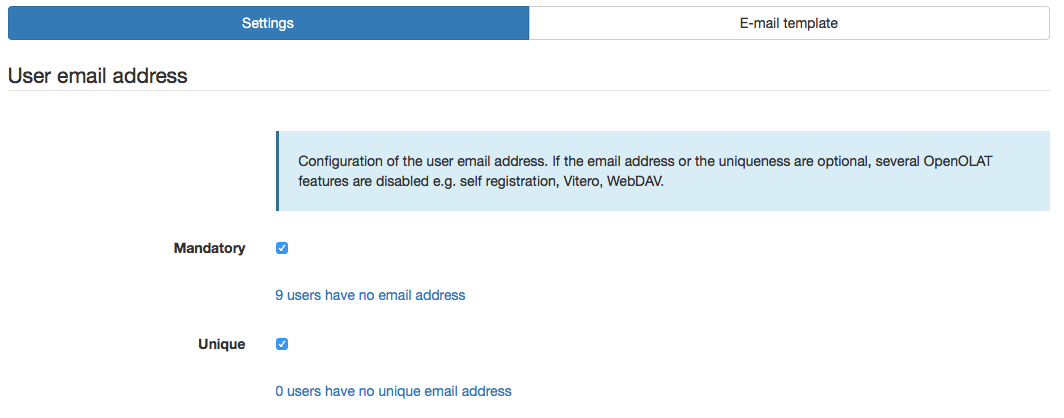
Mandatory
If this option is not activated, it means that the email address is optional for an account. However, this will lead to limitations, as OpenOlat is set up for every person having an email address. The following limitations occur (list is not exhaustive):
- No real emails are sent.
- No notifications are sent.
- Login with the email address is not possible.
- The password cannot be reset.
Unique
If this option is not activated, it means that several accounts can have the same email address. The following limitations occur (list is not exhaustive):
- Login with the email address is deactivated in general. This means that nobody on the whole platform can log in with the email address any more, only with the username. This also applies to accounts with a unique email address.
- For accounts without a unique email address, resetting the password only works by entering the username, no longer by the email address.
Attention
In both cases either no emails or no unique emails can be sent. Therefore we strongly recommend activating the internal OpenOlat inbox! Otherwise unexpected errors may occur!
E-mail inbox and outbox
OpenOlat has an internal inbox that lists all emails sent and received in OpenOlat in the personal inbox of each person: User tools: E-Mail. The OpenOlat inbox is an optional component.
Enable the OpenOlat inbox
- If the OpenOlat inbox is switched off, all emails created in OpenOlat are sent exclusively to the personal email address. The OpenOlat inbox is not visible in the user tools.
- If the OpenOlat inbox is switched on, all received and sent emails are listed in the personal inbox of each person.
Under "Standard settings for e-mail sending" you define the default behaviour as a system administrator:
- "Send e-mails to the internal OLAT inbox"
- "Send e-Mails to the internal OLAT inbox and the personal e-mail address"
In addition, every person can define in their personal settings under "E-mail delivery" where OpenOlat delivers their e-mails. This own choice overrides your default setting. The default setting only applies to the persons who have not made a choice themselves. Without a valid e-mail address in the profile, no delivery to the outside takes place in any case.
Independently of both settings, every person forwards single messages from the inbox to their own address: User tools: E-Mail.
Inbox and outbox
For the inbox and the outbox you define separately what a person sees about the other recipients of an email. The same two switches are available in both areas:
- "Show the name of the recipient"
- "Show e-mail address"
E-mail template
OpenOlat sends emails for various events. To make the emails look more attractive, they are sent as HTML emails including formatting. Using the email template you modify the general appearance of the emails.
The email template applies to all emails and controls only their appearance, not their text. You define the text of an individual email where the email originates: Texts of individual emails.
The following variables have to be in the template:
- $content: Is replaced with the actual content of the email. The content is usually adapted to the language of the recipient.
- $footer: Is replaced with the footer. The footer is adapted to the language of the recipient and can be changed for each language with the language adaptation tool (variables
footer.no.userdataandfooter.with.userdatain the packageorg.olat.core.util.mail).
Texts of individual emails
Several functions of OpenOlat come with their own mail text. You adapt this text in the respective function, not in the email template:
- Course reminders: subject and mail text of every reminder, with their own variables.
- Course Element "E-Mail": subject and message as a template for the emails that the course element sends.
- Course Element "Test": subject and mail text of the confirmation after the test submission, either from the template or as your own text.
- Course Element "Task": pre-formulated text of the confirmation after the final submission, adaptable in the tab "Submission".
- Correction workflow of a test: mail text for the notification of the correctors, either as your own text or from a template.
- Certification program: templates of the prepared notifications and of the reminders for the recertification, adaptable in the tab "Messages".
- Members management: in the last step of the wizard "Add members" you formulate the email to the new members, likewise with variables.
- e-Assessment Administration: Test: system-wide pre-formulated texts for the emails to the people involved in the correction workflow, in several languages.
- Life cycles: Account: notifications before and after account expiry, deactivation and deletion, each step separately formulated.
- Automatic Group Life Cycle: notifications before and after the inactivation as well as before and after the deletion of a group.
Texts of the system mail templates
Many emails are created without any action by a person: the validation code for the registration, the message before an account expires or the confirmation when joining a group. A system mail template sets the text of these emails. For these templates there is no text field in the system administration. Their text is stored as a variable in the language package of the respective function.
You adapt the text with the language adaptation tool in the system administration under:
Administration > Customizing > Language adaptation tool
The guide How do I use the language adaptation tool? shows step by step how to find the variable for a text and how to change its value.
The obstacle is not the tool, but finding the variable: the mail texts are spread over the language packages of all functions that send emails. If you do not find the matching variable, contact the support of your OpenOlat instance. There you learn in which package the variable is located and what it is called.
E-Mail signature
With the E-Mail signature, OpenOlat appends the personal text of a person to the end of the emails that this person sends from OpenOlat via an email form, for example via the course element "E-Mail", the course element "Participant list" or the members management. The text sits at the end of the message in the email form, where it can still be edited before sending. Every person enters their signature themselves: Profile.
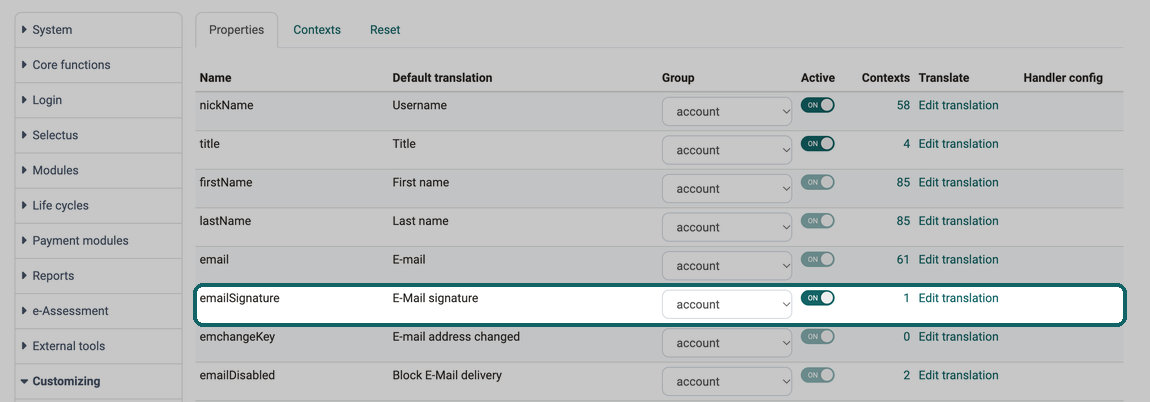
On a new installation the field "E-Mail signature" is already in the profile: the property "emailSignature" is active in the system configuration and included in the context of the profile. If the field is missing from the profile of your instance, its saved configuration differs from this. Then check two places in the system administration under:
Administration > Customizing > User Properties
What a property and a context are is explained in the section User properties.
Step 1: Tab "Properties", activate the row "emailSignature"
Screen
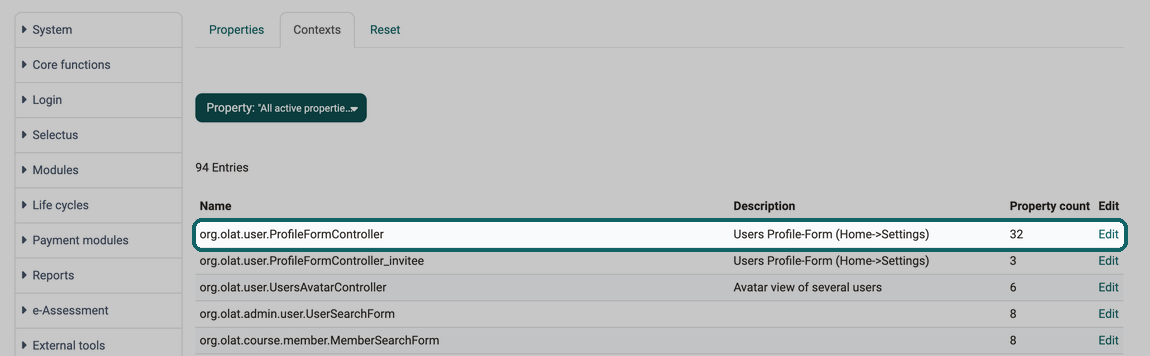
Step 2: Tab "Contexts", click "Edit" in the row "org.olat.user.ProfileFormController"
Screen
In the dialog "edit Context", switch on the switch in the column "include" in the row "emailSignature". Only then is the field available in the profile.
Screen
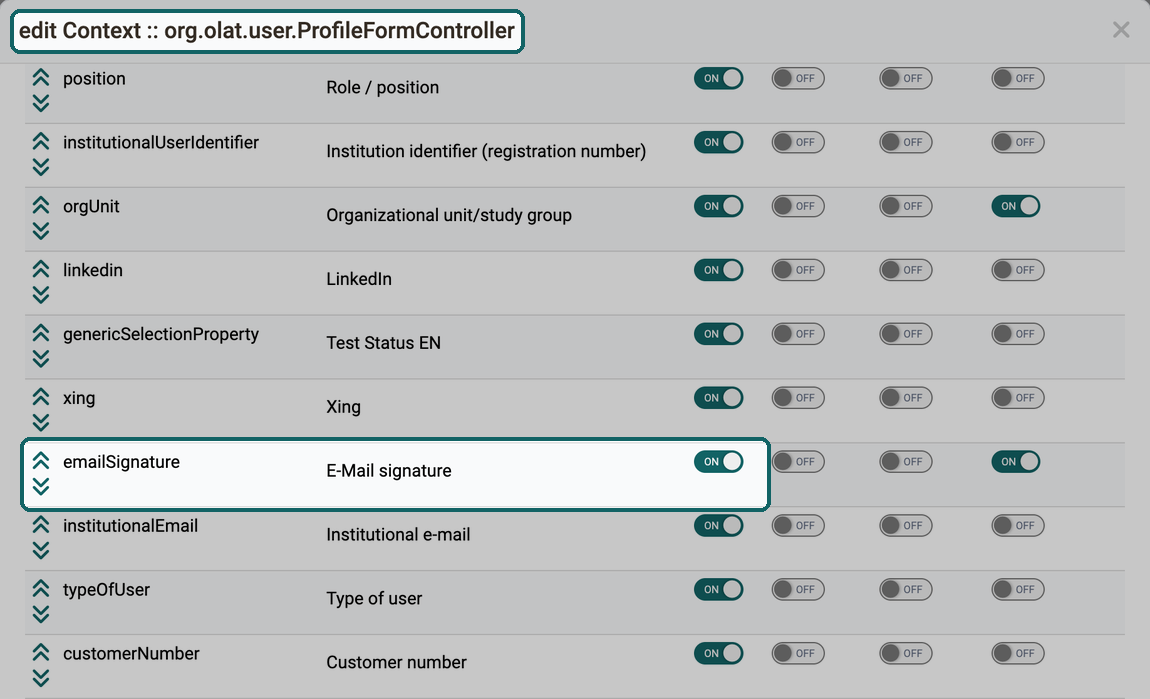
We recommend switching on only "include" in this row. "Mandatory", "Admin only" and "User: readonly" stay off: this way every person enters their signature voluntarily and changes it themselves. This setting corresponds to the system configuration.

Further information
Mentioned on this page
User tools: E-Mail >
Personal Configuration: Settings >
Course Reminders >
Course Element "E-Mail" >
Set up a test >
Course Element "Task" >
Test settings - Administration >
Course Planner: Certification programs >
Members management >
e-Assessment Administration: Test >
Life cycles - Overview >
Automatic Group Life Cycle >
How do I use the language adaptation tool? >
Profile >
Customizing: Overview >